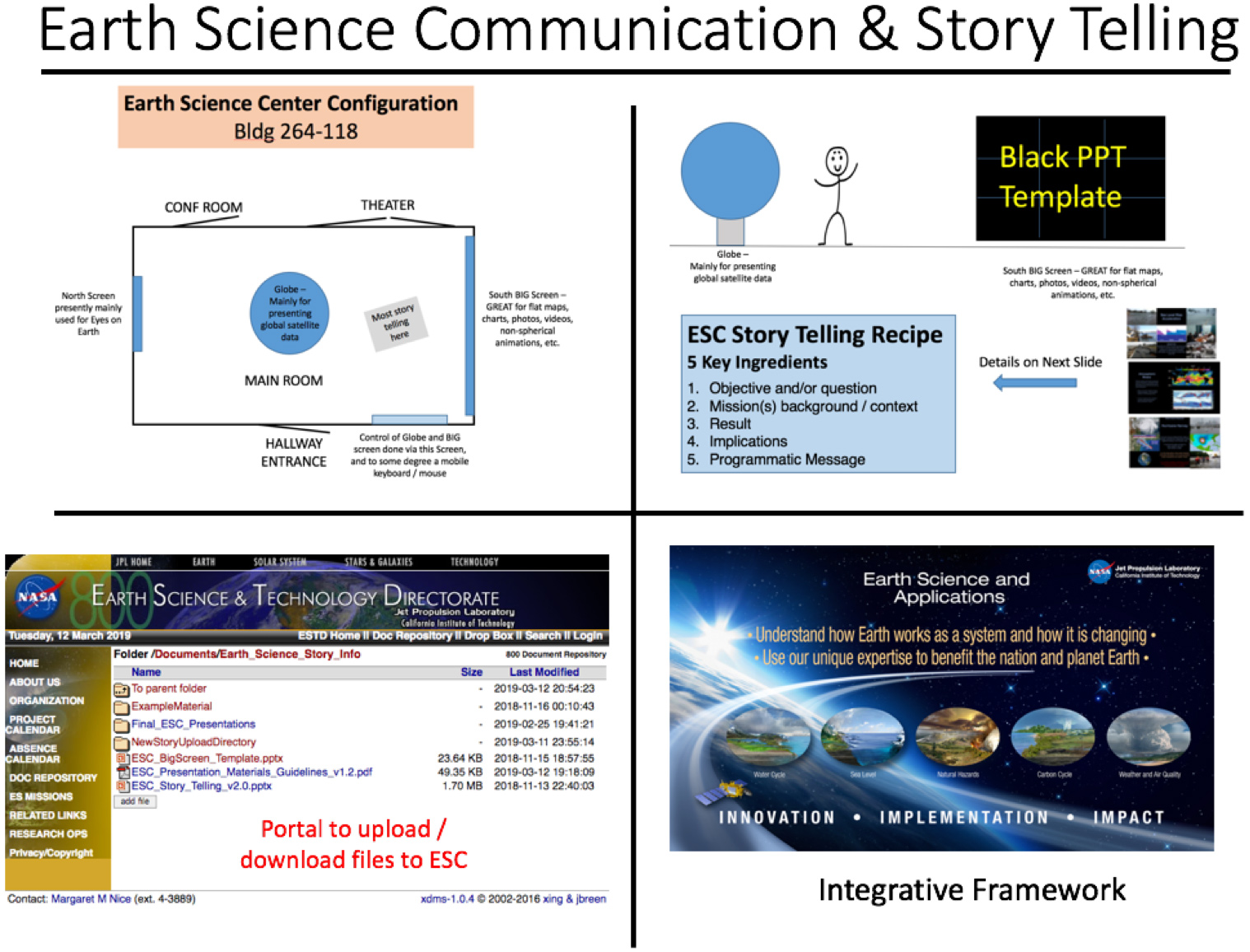
JPL Earth Science Presentations
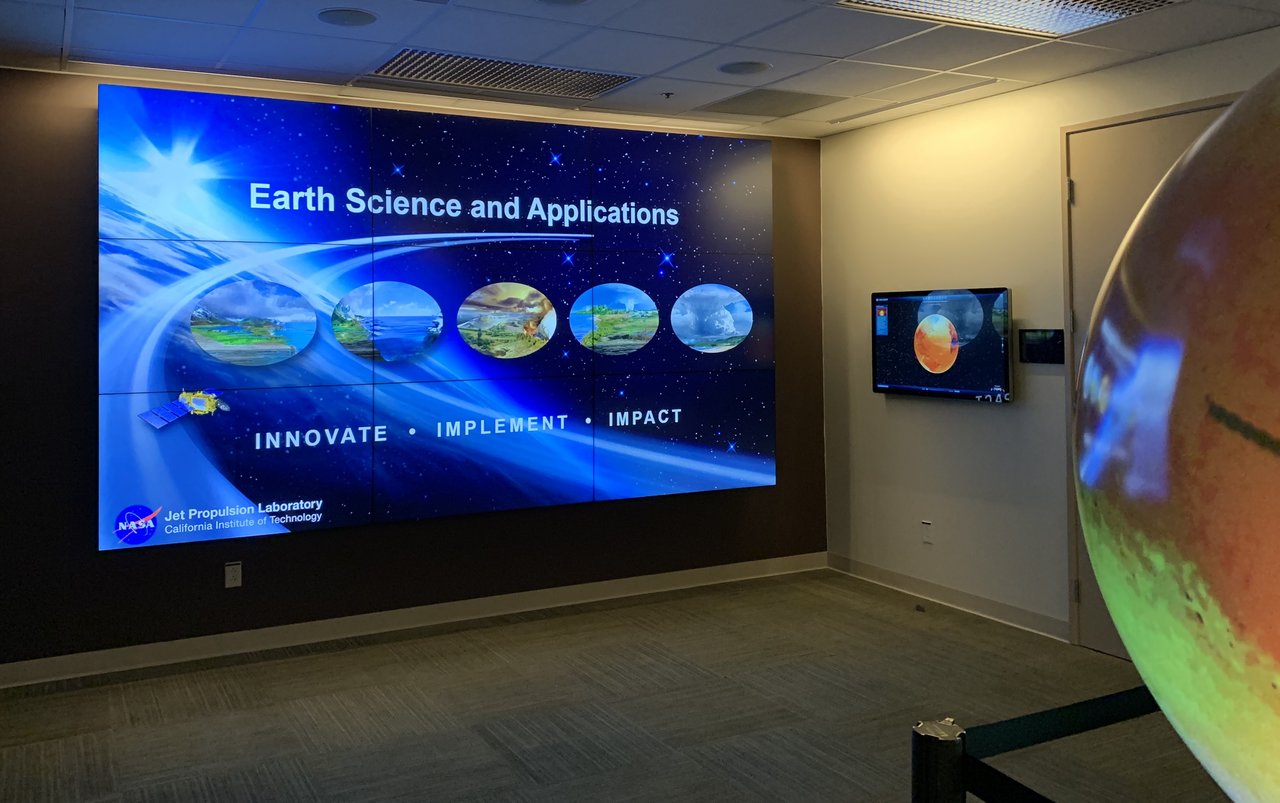
ESC Video Wall, Globe and Touch Screen
ESTD has moved to an open access paradigm for Earth Science Center (ESC) storytelling. A foundational element of this is to utilize Microsoft Powerpoint (PPT) to the full extent possible in the creation and maturation of ESC stories for the ESC 12' x 8' Video Wall. This paradigm will allow for significant enhancements to the past ad hoc presentation paradigm for getting ready and presenting to VIPs. With the development and adoption of a few standards for our PPT presentations, we enable more of the Earth Science community to more quickly take advantage of the ESC and associated hardware, with minimal assistance from venue specialists. Thus, in addition to use for JPL tours and Earth Science and Technology high level visitors, any project or mission is in a position to readily utilize the ESC Video Wall, with augmentations provided by the globe, 3D theater and internal conference room.
Reservation Logistics
To give a presentation in the ESC you must reserve the room with Public Services, request badge reader access and have received basic ESC equipment training. Below are the detail on each.
To reserve the ESC, please contact Public Services at tour.reservation@jpl.nasa.gov.
Basic ESC equipment training can be received by arranging a 15 - 30 minute appointment with either Jason Craig (Jason.S.Craig@jpl.nasa.gov) or Steve Kara (Steve.Kara@jpl.nasa.gov).
A Tier 2 identity/background investigation is required for badge reader access to building 264 and the ESC. Please contact Denise Gutierrez denise.gutierrez@jpl.nasa.gov for more information. If that cannot be arranged, please contact Cathy Thomer catherine.e.thomer@jpl.nasa.gov in the 8X Directorate office for guidance on access to 264 and the ESC. Please contact Jason Craig to upload your presentation.
Presentation Suggestions
Presentations in the Earth Science Center (ESC) may include the following:
- Eyes on the Earth (EotE) presentations on Globe, touchscreens and video wall.
- 2D and 3D movies in the ESC Theater or video wall and touchscreens.
- PowerPoint (PPT) presentations in the theater, touchscreens and/or video wall (simple or complex referencing other PPTs and separate animations)
- 360 Videos on the Globe.
Note: For specifics on formats, file sizes and detailed procedures for each of the above, please see the “ESC Presentation Materials Guidelines” section below.
Basic procedures for above presentations:
- Eyes on the Earth is configured for immediate use in the ESC on both touchscreens, the 4’ diameter GeoDome Globe (Globe) and the 12’ x 6’8” video wall.
- Movies need to be uploaded to the Docushare directory listed immediately below and will be made available for playback on either the theater screen, controlled from the small touchscreens in the theater or on the video wall and touchscreens controlled from the touchscreen nearest the video wall. Contact Jason Craig and he will stage them.
- PowerPoint (PPT) presentations, in 2D, can be shown immediately on the 3D theater screen from the theater podium or on the video wall using a laptop you provide. The laptop must be able to display 1920 x 1080 from an HDMI output either natively or with an adapter. If you want to use the ESC computer, which allows control of your presentation from the touchscreen and/or small, wireless remote control, you must upload your PowerPoint file to the ESTD Document Repository’s /Documents/Earth_Science_Story_Info/NewStoryUploadDirectory” and contact Jason Craig so he can stage them. (This process will be more automated in the near future.)
- 360 Video movies need to be uploaded to the Docushare directory listed immediately above and will be made controllable from the touchscreen nearest the video wall. Contact Jason Craig and he will stage them.
You are encouraged to study the examples and follow the guidelines for ESC presentation found in the ESTD Docushare /Documents/Earth_Science_Story_Info directory and shown below.
Any questions about the contents of this document or how to use the ESC should be send to Jason.S.Craig@jpl.nasa.gov
Guidelines for JPL Earth Science Center Presentation Materials
Presentations in the Earth Science Center may include the following:
Eyes on the Earth presentations: By default, Eyes on the Earth is configured for immediate use in the ESC on both touchscreens, the 4’ diameter GeoDome Globe (Globe) and the 12’ x 6’8” video wall. (The video wall may be displaying a movie but can be switched to Eyes on the Earth in seconds.)
PowerPoint (PPT) presentations, in 2D, can be shown immediately on the 3D theater screen from the theater podium on a laptop you provide. The laptop must be able to display 1920 x 1080 from an HDMI output either natively or with an adapter. Please bring your own adapter to insure you’ll be able to connect. (The instructions on how to configure the 3D theater for podium laptop use are simple and will be given to those who have permission to use the facility.) If you want your presentations to have maximum impact in the ESC we highly recommend you read and follow the guidelines and use the PPT template provided in the ESTD Document Repository. (ESC_BigScreen_Template.pptx and ESC_Story_Telling_v2.0.pptx) They are found at https://estd-vm.jpl.nasa.gov/xdms-special/main/folder.browse.php?id=2258“800_Directorate/Documents/Earth_Science_Story_info.” Three good examples of full PPT presentations, that work very well in the ESC, are located in the “ExampleMaterial” folder also located in the above-mentioned directory.
PowerPoint presentations may also be shown on the video wall in two ways.
- You may connect your laptop that can display 1920 x 1080 from an HDMI output, either native or adapted, to the HDMI port in the ESC wall, across from the entry doors. I recommend bringing your own HDMI cable. (Instructions on how to configure the video wall will be given to those who have permission to use the facility.)
- Upload your PowerPoint file to the ESTD Document Repository’s “NewStoryUploadDirectory” found at https://estd-vm.jpl.nasa.gov/xdms-special/main/folder.browse.php?id=2263”800_Directorate/Documents/Earth_Science_Story_info/NewStoryUploadDirectory” and contact Jason Craig so he can stage it for you in the ESC. If your presentation requires supplemental files or references other PPT presentations, please place them in a folder and compress them into a .zip file for upload. (File size may not exceed 3.75GB.) Once staged, you’ll be able to start your presentation by touching an appropriately labeled button on the 42” ELO touchscreen (ELO) immediately adjacent to the video wall. PPT slide control will be available either from the ELO or a small, wireless remote control.
Presentation formats:
Video Wall - the native resolution is 5760 x 3240 pixels. This is an aspect ratio of 1.77. Full screen images less than 1920 pixels across, start to look “fuzzy.” (Images that are .dds or .png are preferable to .jpg)
Globe – Both for animations and static data sets it is highly recommended that 4096 x 2048 pixel resolution images be used. You can display any 2:1 aspect ratio movie or image but quality drops off quickly when resolutions below 4096 x 20148 are used. The preferred animation format is .dds, however, MPEG-4 (.mp4) will work. If possible, please use the H.265 codec with a high bit rate. A bit rate around 128 Mb/s is good.
3D projector – For displaying 2D or 3D movies and 3D stills not currently included in the standard list of Movie items on the Crestron touch screens in the theater and next to the ELO, adequate advance notice must be given to Steve Kara or Jason Craig so they can be installed. Again, place them in the above listed ESTD directory and notify them via email.
The resolution of the projector for 3D display is 2560 x 1440 pixels. Standard resolutions, 1920 x 1080 or 1920 x 1200 will work as well for 2D and 3D items that can be shown. Again, for animations the preferred animation format is .dds. MPEG-4 (.mp4) will work. If possible, please use the H.265 codec with a high bit rate. (128 Mb/s)
Both the ELO (42” Touchscreen near the Video Wall) and the 55” touchscreen on the “Land Wall” can also be used for displays. They are 1920 x 1080 pixel native (16:9 aspect ratio) monitors.
Any questions about the contents of this document or how to use the ESC should be send to Jason.S.Craig@jpl.nasa.gov.